
What a handheld 3D scanner does on the shop floor
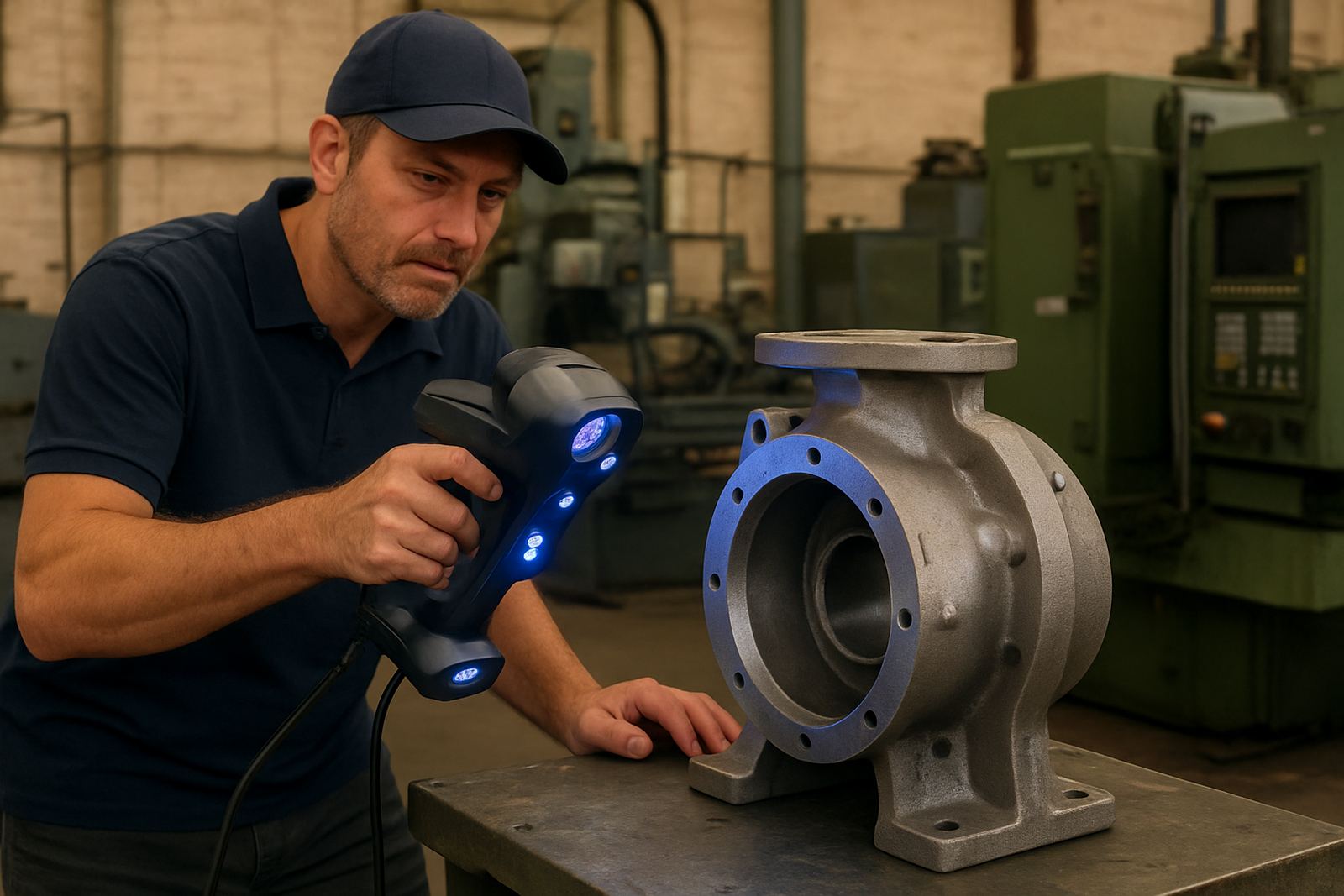
A handheld 3D scanner captures the shape of a part as a digital point cloud or mesh, so you can measure, compare, reverse engineer or archive it without stripping the machine line or sending the component away. It is useful for worn castings, brackets, housings, moulds, trim parts and fixtures where a vernier or CMM probe can only reach so far. For South African workshops dealing with short lead times, it saves hours when a part must be checked before the next shift, or before load-shedding cuts into production.
These systems are suited to dark, shiny or matt surfaces, depending on the scanning setup and the part prep used. On a factory floor in Markman, a maintenance bay in Kariega or a repair workshop in Coega, the scanner can be moved to the job instead of moving the job to the scanner. That makes it practical for large assemblies, awkward parts and items that are too fragile to clamp hard.
- Reverse engineering of existing parts with no drawing available
- Dimensional inspection against CAD or a reference part
- Surface capture for repairs, mould work and pattern making
- On-site checks for wear, deformation and fit-up issues
Scanner options, sizes and capture ranges
Handheld scanners are normally chosen by capture volume, accuracy target and the type of surfaces you need to read. Small-field units are better for fine detail, edge definition and smaller mechanical parts. Medium and larger field systems suit castings, fixtures, body panels, machine guards and assemblies where speed matters more than ultra-fine detail.
Most systems are supplied with a handheld scanning unit, calibration target, software licence and carrying case. Some models use structured light, some use laser line capture and some combine both approaches. For busy service teams, a lighter body and faster frame rate matter just as much as headline accuracy because the operator may be scanning for long shifts in warm workshops, sometimes in high humidity near the coast.
- Typical capture distance: 150 mm to 500 mm depending on lens set
- Point accuracy: commonly from 0.02 mm to 0.05 mm in controlled conditions
- Scan speed: up to several million points per second, depending on model
- Field of view: from fine-detail small parts to larger industrial assemblies
- Output files: STL, OBJ, PLY and other common engineering formats
Where handheld scanning suits local manufacturing work
This product suits toolrooms, automotive suppliers, fabrication shops, mining support businesses, plastics moulders and general engineering firms across Gqeberha, Despatch, Port Elizabeth CBD and the Coega area. It is especially useful where a part must be checked in place, for example on a machine bed, inside a jig or around a fixed installation that cannot be dismantled easily.
For inspection work, the scanner helps compare a physical part to a nominal model or to a worn sample, so you can spot shrinkage, distortion and uneven wear. For reverse engineering, it gives a starting point for drawing up replacement components when the original supplier is no longer available. Many shops also use it for fit checks before machining a replacement, which cuts down on trial and error and wasted material.
The system is also useful where people need to capture textures or surface condition for documentation. A corroded flange, a fractured bracket or a repaired casting can be scanned and retained as a digital record for QA, insurance or planning the next repair cycle.
Power, setup and site conditions to plan for
Most handheld scanner kits run from a standard 220 V supply through a laptop or control box, with low power draw compared to machine tools. No gas supply is needed. In a plant with load-shedding, the practical point is to keep the laptop, scanner and software on a UPS or backup supply if scans must continue without interruption. If power drops during a scan, the job may have to be re-aligned, so steady supply is worth planning for.
Installation is straightforward. The scanner is paired to the software, calibrated with the supplied target and checked against a known artefact before use. The work area should have even lighting, stable temperature where possible and enough space to walk around the part. On oily or reflective surfaces a light surface spray or removable scanning aid may be needed. In coastal areas such as Gqeberha, salt air and humidity can affect storage, so dry cupboards and sealed cases help keep optics clean.
- 220 V supply for laptop, charger or control unit
- UPS recommended where load-shedding interrupts capture work
- No compressed air or gas connection required
- Stable lighting and a clean, dry setup area improve repeatability
Care, calibration and servicing between jobs
Like any inspection tool, a handheld scanner needs careful handling if it is to keep its accuracy. Keep lenses clean, protect calibration targets from bending and store the unit in its case after use. Avoid rough transport in the back of a bakkie without padding, because small knocks can throw the alignment off and affect the quality of the mesh. For regular users, a quick check before each shift is sensible, especially when different operators use the same kit.
Tooling can assist with scanner calibration and support maintenance planning around the scanner itself. If the unit is used every day, set a schedule for firmware updates, calibration checks and software review. It also helps to keep a log of parts scanned, settings used and any issues with reflective surfaces or vibration. That record makes it easier to repeat good results and spot problems early. A missed calibration can cost more than the service, so it is worth keeping on top of.
- Clean optics with suitable non-abrasive materials only
- Inspect cables, connectors and brackets for wear
- Check calibration before critical inspection work
- Store targets flat and dry to avoid warping
What to confirm before you place an order
Before ordering, check what size parts you will scan, the level of detail required and whether the main work is inspection, reverse engineering or surface capture. The right setup for a gearbox housing is not always the right one for a small precision bracket. Ask for the expected accuracy, working distance, file formats and software compatibility, because the scanner must fit your downstream CAD or metrology process.
Also confirm the operating environment. A workshop in Struandale may have dust and vibration, while a site near the coast may face humidity and corrosion risk. If you need on-site support, training, calibration or collection and delivery, tell us early so we can plan the best option. We also help with preset questions around material type, gloss level and whether the part can be moved or must be scanned in place. That saves time when the job is urgent and the machine cannot sit idle.
- Part size and expected scan area
- Required accuracy and inspection tolerance
- File type needed for CAD, CAM or reporting
- Surface finish, reflectivity and colour of the part
- Need for training, calibration or on-site support
Key facts
| Scan type | Handheld 3D surface capture for point cloud and mesh output |
|---|---|
| Typical accuracy | 0.02 mm to 0.05 mm depending on setup and part conditions |
| Working distance | Approx. 150 mm to 500 mm depending on lens and model |
| Power requirement | 220 V supply via laptop, charger or control unit, no gas needed |
| Output formats | STL, OBJ, PLY and other common engineering file types |
| Use cases | Reverse engineering, inspection, wear checks, moulds, fixtures and large parts |