
Controlled scanning for small parts and fine detail
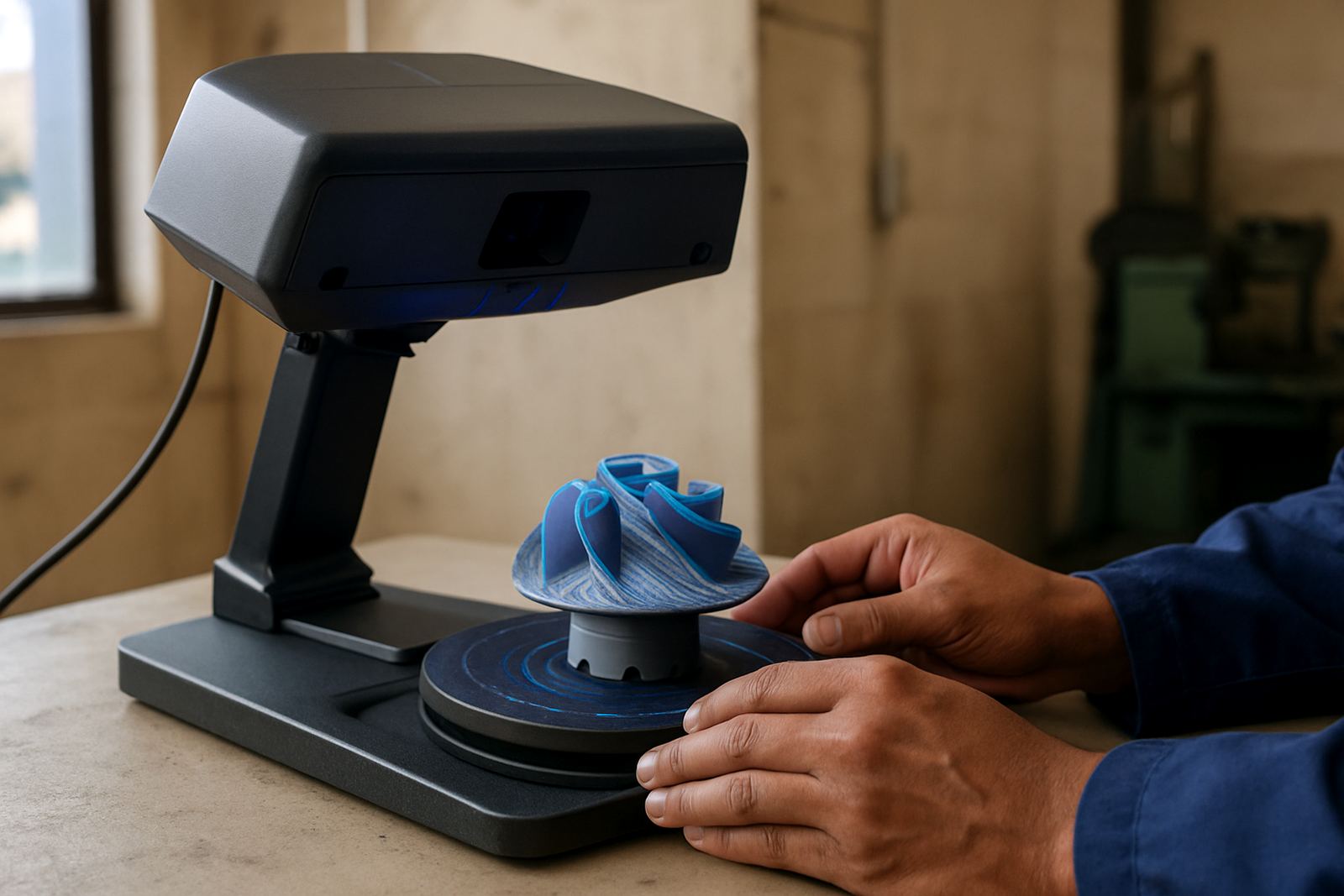
A desktop 3D scanner is a benchtop unit used to capture the shape of small components in a controlled setting. It is a practical choice for machine shops, pattern makers, prototyping rooms and quality control teams that need consistent results on items such as brackets, inserts, castings, housings and turned parts.
Unlike portable units used across a workshop floor, a benchtop system keeps the part, scanner and lighting in one fixed position. That makes it easier to get repeatable scans on parts with holes, edges, threads, undercuts and mixed finishes. For shops in Gqeberha, Kariega and Coega, that repeatability helps when power interruptions or busy production schedules leave little room for rework.
Desktop scanners are usually used with turntables or fixed trays, and they work best on parts that can be placed safely within the scan volume. For very shiny or black surfaces, a light scanning spray may help, although many parts can be scanned as received if the finish is suitable.
Typical sizes, scan volume and model options
Most desktop systems are supplied in compact formats for benches and metrology rooms. Depending on the model, scan volume may range from around 100 x 100 x 100 mm for very small parts up to about 500 x 500 x 500 mm for larger bench items. The right choice depends on the smallest detail you need to resolve and the largest part you plan to capture.
Some units are supplied with a fixed turntable, while others allow manual positioning or indexed rotation. Where higher detail is needed, a smaller scan area and finer point spacing are usually preferred. For general workshop use, an adjustable setup gives more flexibility when scanning fasteners one day and machined housings the next.
- Small format scanners for jewellery, inserts and miniature components
- Mid-range units for machined parts, castings and tooling accessories
- Systems with turntables for repeatable batch scanning
- Options for texture capture on parts where surface colour matters
Where this scanner suits best in South African workshops
This product suits jobbing machine shops, repair centres, product development teams and inspection departments that need digital part capture without a large footprint. It is often used for reverse engineering worn parts, checking first-off samples, comparing manufactured parts against an original shape and preparing files for 3D printing or CNC work.
In the Eastern Cape, it fits neatly into smaller production spaces in Struandale, Markman and the Port Elizabeth CBD where bench space is limited. It is also useful where humidity and dust can affect open workshop equipment, because the scanner is generally kept indoors on a stable surface with controlled lighting.
For shops working across the region, a desktop scanner can support service jobs where a client brings in a broken or worn part for quick measurement. It is especially handy for components that are difficult to measure with callipers alone. That saves time and, in a lot of cases, avoids a second strip-down.
Installation, power and workspace requirements
Installation is straightforward, but the scanner should be set on a rigid bench with minimal vibration. A flat surface, stable room temperature and controlled lighting will improve repeatability. It should not be placed near grinding dust, oil mist or direct sunlight, as those conditions can affect scan quality and, over time, the unit itself.
Most desktop scanners use standard single-phase electrical power through a normal workshop outlet. A clean power supply or surge protection is recommended, especially in load-shedding areas where voltage changes can occur when equipment starts up again. If the system includes a turntable, lighting ring or calibration board, those items are normally powered from the same workstation connection.
- Allow a clear bench area around the scanner and monitor
- Keep the room dry and free of heavy airborne dust
- Use stable internet only where software updates or cloud storage are required
- Leave space for calibration targets, spare cables and scan spray
Care, calibration and servicing to keep scans accurate
Regular care keeps the scanner accurate. The lens area and working surface should be kept clean with a soft lint-free cloth, and any calibration board must be stored flat and protected from scratches. Small alignment issues can show up quickly in scan data, so it is worth checking setup before a production run begins.
Tooling supports related workshop services such as scanner calibration, inspection, runout checks and collection and delivery where required. For desktop scanners, basic servicing often includes cleaning, software checks, cable inspection and calibration verification. If the unit is used daily, a short routine check at the start of the shift can prevent frustrating re-scans later on.
Parts with heavy contamination should be cleaned before scanning. Oil, polishing residue and loose dust can create false surfaces in the model. Where the scanner is used with printers as part of a full digital workflow, keeping both machines in good order helps avoid compounding errors. A small misalignment early in the process can throw off the final result, more than many shops expect.
What to check before you place an order
When ordering a desktop 3D scanner, check the smallest detail you need to capture, the largest part size you expect to scan and the finish of the parts. If you work with dark plastics, polished metal or translucent items, ask about surface preparation and whether the scanner can handle those materials without extra steps.
It is also worth confirming the output format, software compatibility and whether your team needs colour capture or only geometry. If the scanner will be used for inspection, ask how the data is exported for comparison reports. If it will support 3D printing, check that the file types suit your slicer or CAD package.
- Required part size and scan volume
- Level of detail needed for inspection or reverse engineering
- Material type, finish and whether scan spray is acceptable
- Power supply and bench space available
- Software, file output and operator training needs
For machine shops serving Kariega, Despatch and wider South Africa, the right scanner should fit the workshop first and the software second. A well chosen setup gives you dependable data, less manual measuring and fewer delays when a part needs to be copied or checked quickly.
Key facts
| Scan type | Desktop / benchtop 3D scanning |
|---|---|
| Part size range | Typically small to medium parts, about 100 x 100 x 100 mm up to 500 x 500 x 500 mm depending on model |
| Power | Standard single-phase workshop supply, with surge protection recommended |
| Typical output | 3D mesh files for CAD, inspection and print prep |
| Best use | Small parts, repeatable capture, reverse engineering and quality checks |
| Maintenance | Lens cleaning, calibration checks, cable inspection and software updates |